BIS2001 IT Infrastructure and Networking Lab 2 Assignment
Unit Learning Outcomes
On successful completion of this unit, students will be able to:
- Demonstrate an understanding of layered networking models, computer network architectures and components.
- Design and plan IP networks and IT infrastructure solutions for businesses, allowing scaling of applications.
- Implement moderately complex networks with industry-standard technologies like CISCO routers and switches.
- Solve data communication and networking problems using rigorous analysis techniques.
- Appraise different types of network security devices and how they can be used.
LAB 2. Cisco Packet Tracer familiarisation
Objective:
- Familiarise students with the components of a computer network
- Give students hands-on experience with Cisco Packet Tracer network simulation software
1 Add and Remove Module
You can add/remove modules and interfaces to a network device in PT in a similar way it is done in practice: i) power off the device, then ii) insert/remove the required modules /interfaces, then iii)power the device back on. To perform the add/remove module and interface card in PT, bring up the device configuration dialogue and navigate to the physical view tab if not already there. Next, locate the device power switch and switch off the device by clicking on the power switch. Find the required module/interface from the list of available modules and interfaces, then drag and drop it to an empty slot on the device. If you see the module attached to the device, the operation is successful. Try to drag and drop again if not successful. Finally Power the device on. The removal is done by dragging existing modules to the module list.
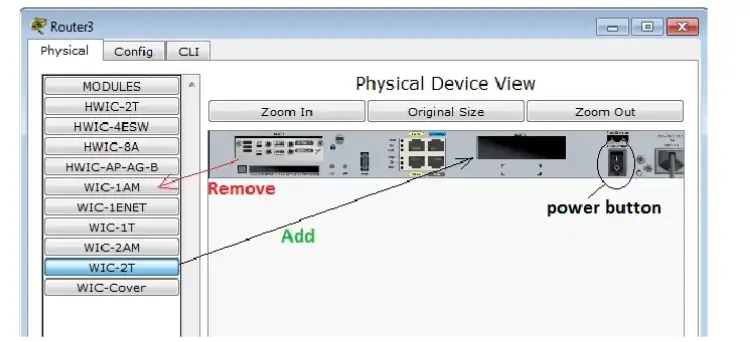
Your task: add a Cisco 2621XM router to the project layout, then add a WIC-2T interface to the first slot and a WIC-1 AM to the second slot. Take a screenshot to show that you have successfully added the interfaces. Next, remove the WIC-1 AM and replace it with WIC-1T, then take a screenshot. Finally, add NM-4E to the available slot and power on the device. Take a screenshot to showthat you have completed the task.
2 Network Physical Connection Familiarisation
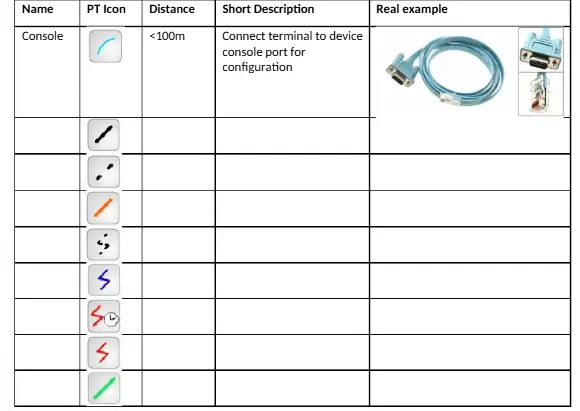
Your task: complete the following table. An example has been done for you.
3 Network Operating System Familiarisation
Cisco Systems provides two families of network operating systems:
- Internetwork Operating System or IOS and
- Next Generation Operating System or NX-OS
The main difference between IOS and NX-OS is that NX-OS supports network virtualisation while IOS does not. Otherwise, the two systems are similar from a configuration point of view.
Watch the video (here) to understand how to establish a Console Connection to CISCO Devices.
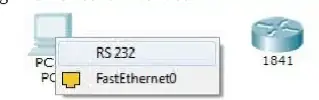
Your task: add a Cisco 1841 router and a generic PC to the project layout. Next, add the WIC-2 T card to the router. Connect the PC to the router via the console port. Note that the console cable connects to the PC through the RS-232 serial interface.
Next, bring up the PC terminal program by clicking on the PC icon and choose Terminal programfrom the Desktop tab (see below).
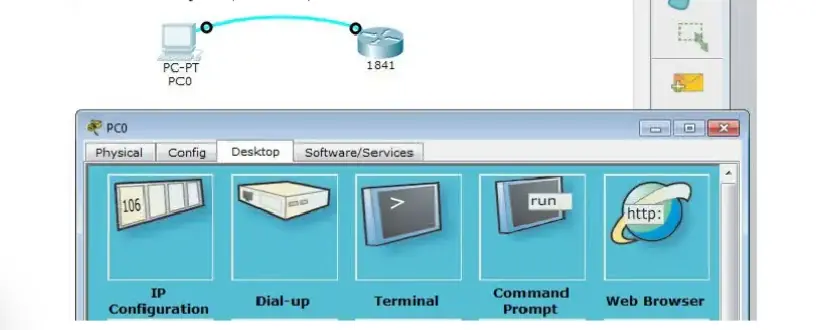
Accept the default terminal configuration, and you will be presented with the router's IOS CommandLine Interface or CLI.
Report the following router parameters:
- Device name and revision number:
- Device memory (RAM):
- Processor board and processor ID:
- Cisco IOS version and ID
- Available interfaces:
Answer the following:
1. Complete the following table with the suitable building block type.
| Item |
Building Block Type |
| laptops |
Client applications- Applications Building Block |
| Linux Operating System |
|
| Data Base Server |
|
| Oracle Virtual Machine |
|
| FTP servers |
|
| ipad |
|
| DHCP server |
|
| Remotely logging in |
|
| Staff email |
|
| Online Learning System |
|
2. Differentiate between functional and non-functional attributes, with examples to support your answer.
4 Lab submission
Put your name and student ID in this lab document and submit your report during the workshop session to the APIC online learning system.
The lab work will contribute to your final assessment results with 8%
You need to submit 2 files
- Word document that includes any screenshots of your work
- Answers to questions
 Get Expert-crafted assignments